Monthly accommodation statistics · Azores

SREA reports for Azores alojamento local.

For alojamento local owners in the Azores: turn Airbnb files into the guest, overnight-stay and revenue figures for SREA WebReg — the regional statistics reporting service.

Open Fast AL Azores

No account needed. Your files stay in your browser.

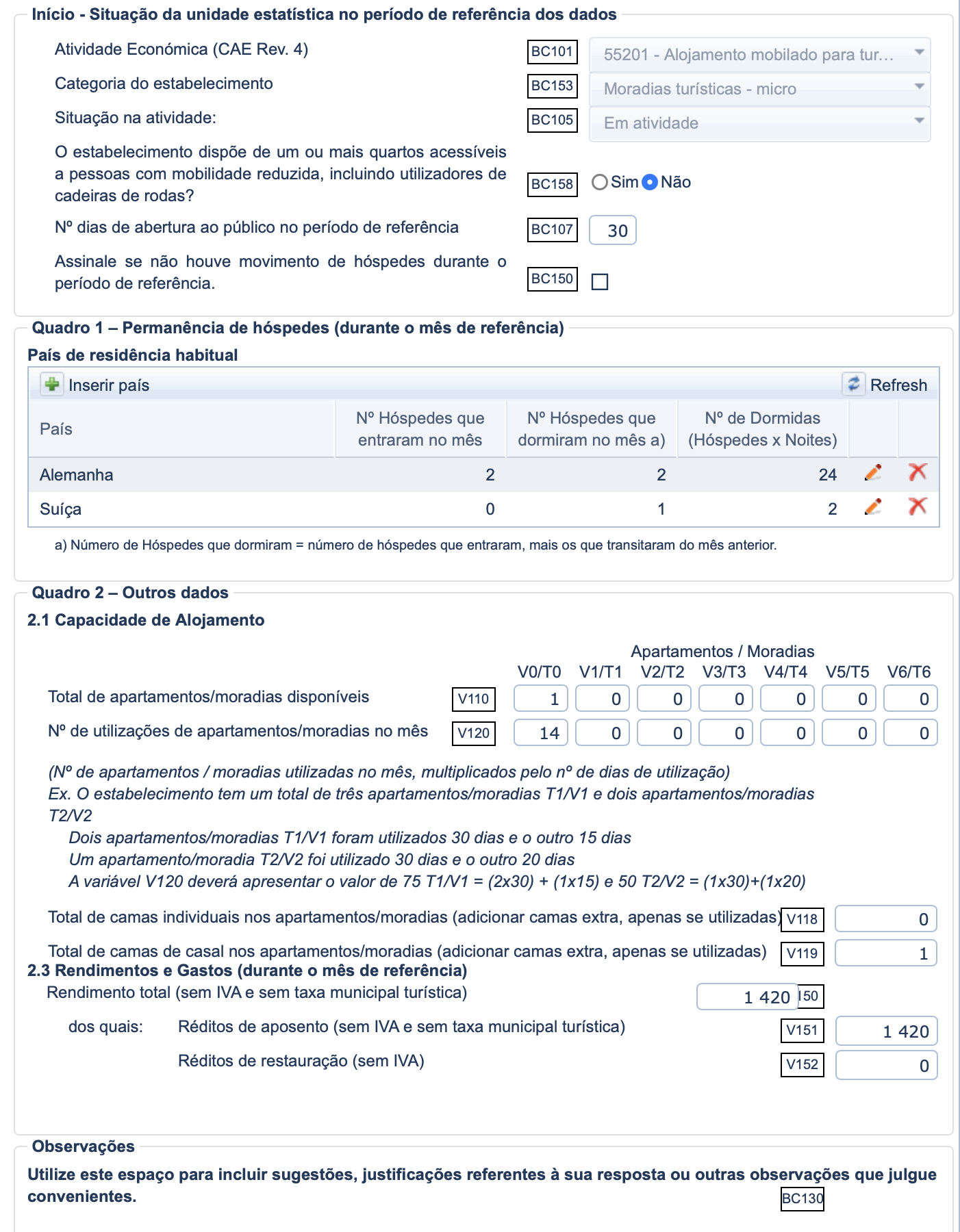
Recognise the statistics form?
SREA WebReg's accommodation statistics form, with Portuguese labels, field codes, guest counts by country, bed capacity and revenue fields.
SREA WebReg form. Fast AL Azores is an independent tool.

Tourism statistics · SREA / INE

Your monthly SREA WebReg report, in one place.

Another month, another round of counting guests, splitting nights between months and checking revenue. Then comes the old SREA WebReg form: field codes, country rows and totals to enter one by one.

You’re switching between booking exports, guest details and the form, trying to work out which number belongs where. A missed stay or a wrong total sends you back through the records again.

Fast AL Azores does the counting from your booking files and brings the monthly figures together for review. Check guest details, resolve missing information and confirm revenue in one place. Then use the form-filling helper to enter the checked figures in WebReg. You still review and submit the final report yourself.

Example report

Reporting month

August 2026

Sample property
Stays2
Guest-nights18
Days open31
Guests by country of residence
Country Arrivals Guests Nights
Germany 4 4 16
Portugal 0 2 2
Accommodation revenue€550

Check the figures, then enter them in WebReg.

The monthly process

From Airbnb CSV files to SREA report figures.

  1. Import your files

    Add your Airbnb reservations and paid earnings CSV files. Fast AL Azores uses the dates, guest counts and financial amounts.

  2. Check the month

    Confirm guest counts and countries of residence using details guests share on Airbnb. Check stays, opening days and revenue, including any direct bookings.

  3. Fill in WebReg

    Save the browser favorite once. It loads your reviewed month and fills matching fields. You check the form and submit it yourself.

Alojamento local in the Azores

A practical guide to SREA reporting in the Azores.

Fast AL Azores helps owners and managers of local accommodation (alojamento local, or AL) prepare figures for the Serviço Regional de Estatística dos Açores (SREA). It brings Airbnb reservations, paid earnings and direct bookings into a monthly review, with a separate report for each property.

The monthly guest-stay survey is known as IPHH (Inquérito à Permanência de Hóspedes na Hotelaria e Outros Alojamentos). For an AL owner preparing the SREA WebReg return, the key records are who stayed, when they stayed, where they normally live and the accommodation revenue for that month. Fast AL Azores turns those records into figures you can check alongside the form.

Guest arrivals and overnight stays (dormidas)

Review arrivals, guests staying and guest-nights by country of residence. A guest-night is one guest staying one night: two guests staying three nights contribute six guest-nights. Use each guest’s country of habitual residence, rather than nationality. Airbnb profiles may show where a guest lives; confirm through Airbnb messages if it is missing or unclear. The reservations CSV does not include residence, so you add it during the review.

Stays that cross a month boundary

The tool assigns nights to the month in which they occur and excludes checkout day. For example, two guests staying from 30 July to 2 August contribute four guest-nights in July and two in August. Import stays that began in the previous month so those nights are included. Revenue is also split across the stay months: the automatic draft uses an average nightly amount because the Airbnb CSV does not include the price charged for each night. See the revenue formula, examples and official guidance.

Accommodation revenue to review

Import Airbnb’s Earnings → Paid CSV to match financial records to reservations. The export gives stay totals without individual nightly prices, so we use an average to prepare the monthly draft. Review taxes, cleaning, adjustments and direct-booking income, and enter a different total if you have more detailed records. A bank payout is not the same as accommodation revenue.

Property capacity and opening days

Save each property’s SREA establishment code, accommodation units and beds, then review opening days for the reporting month. The checklist highlights missing guest, property and revenue details before you prepare figures for transfer to WebReg.

Countries of residence, including mixed groups

A Portuguese citizen living in Germany belongs in the Germany residence group. If people in one booking live in different countries, split the party into residence groups during review. Check that their counts add up to the number of people who actually stayed, including children and infants.

A complete month across booking sources

A report needs all stays for the selected property, including direct bookings and nights carried over from the previous month. Add missing stays manually and confirm cancellations against your records. Importing a reservations file alone does not establish that your monthly guest and revenue figures are complete.

Fast AL Azores is an independent preparation tool for the C-Alojamento Local form. Consult the current instructions in SREA WebReg for your establishment and reporting period. Other accommodation categories may use different fields. You make the final submission in WebReg.

A worked example

How to count guest-nights across two months.

Two guests check in on 30 July and check out on 2 August. They stay three nights: 30 July, 31 July and 1 August. Checkout day adds no overnight stay. Here is how Fast AL Azores splits that booking.

One booking, two monthly reports — fictional example
Report figureJulyAugust
Guest arrivals20
Guests staying during the month22
Nights occupied by the booking21
Guest-nights (dormidas)42

August has guests and overnight stays even though nobody arrives that month. Filtering only for August check-ins would miss them. Guest-nights count people × nights; occupied nights count the stay itself. Keep both months in your booking records and review each month separately.

Why we use an average nightly price

Airbnb’s standard CSV exports provide reservation and transaction totals, but do not include the exact price charged for each booked night. Fast AL Azores therefore calculates an average from the stay total. This gives you a practical estimate for splitting a stay between months using the information available in your files. See Airbnb’s earnings export guide for the available report options.

How the average is calculated

The automatic draft starts with matched Airbnb reservation gross and known gross adjustments. For each stay, it uses: stay amount ÷ total stay nights × nights in the reporting month. Separate government-tax entries and bank payouts are not added to that amount. Check the classification of taxes, cleaning and other charges before confirming accommodation revenue.

In the three-night example above, assume €300 is all accommodation revenue, with no tax, cleaning or other charges to separate. The average is €100 per night: the draft allocates €200 to July and €100 to August, even if Airbnb paid you the full amount in July. The two guests do not double the revenue.

Using the average as your starting point

You can use the average-based calculation to prepare your monthly draft when the CSV is the price information you have. The app distributes the stay amount in proportion to the nights in each month. Review the amounts and included charges before confirming revenue.

An average may differ from the actual split when nightly prices vary. If you have a more detailed breakdown of the booked charges, including relevant discounts and adjustments, you can use it to refine the total. Edit Accommodation (€) in Review month; your manual amount is kept for that property and month. Use the original booking records for this, rather than current calendar prices.

What the official instructions confirm

SREA’s published AL instructions, page 2 (V151) assign accommodation charges to nights in the reference month and advance payments to the respective stay months. INE’s 2026 APAL instructions, page 3 likewise allocate revenue to actual stay months rather than the invoicing month. These support splitting revenue by the stay dates; neither document specifies flat averaging for variable nightly rates.

We use the average as a practical estimate, without claiming it is an officially approved formula. The SREA PDF uses an older form layout; follow the current instructions for your establishment if they require a different treatment.

Before you start

What you need for your monthly AL report

  • Your property details — enter onceSREA establishment code, available units and beds. Saved in this browser for future reports; only update them when something changes.
  • Airbnb reservations CSVInclude every page and all stays that overlap the reporting month.
  • Airbnb Earnings → Paid CSVInclude all financial columns, or enter a checked revenue total manually.
  • Guest details from AirbnbConfirm guest counts and countries of residence using details guests share on Airbnb, or ask in Airbnb messages. No extra file to upload.

SREA reporting questions

Is this the statistics report I know as “INE”?

INE is Portugal’s Instituto Nacional de Estatística (Statistics Portugal). SREA is the Serviço Regional de Estatística dos Açores (Statistics Azores), which also carries out work as a regional delegation of INE. Fast AL Azores prepares the monthly accommodation figures for SREA’s WebReg form in the Azores. INE’s WebInq is a separate reporting portal and is not supported by this tool.

About SREA and its work with INE. Fast AL Azores is not affiliated with or endorsed by SREA or INE.

Can I prepare reports for more than one property?

Yes. Save each property’s details and review its bookings, guest figures and revenue separately for the selected month. Each WebReg transfer is for one property and one month.

Where is my data stored?

Files are processed on your device. Fast AL Azores saves your work in this browser; it does not upload your booking data. Download a backup before clearing browser data or changing devices.

Does Fast AL Azores submit my report?

No. Fast AL Azores prepares the figures. You review and submit the report on SREA WebReg. The browser helper fills fields; it does not submit the form. Compatibility with the live WebReg form has not yet been verified.

What happens when a stay spans two months?

Guest-nights are counted in the month they occur. Because Airbnb’s standard CSV does not include individual nightly prices, we divide the stay amount by total nights and multiply it by nights in each month. You can use this average as the starting point for your monthly revenue review and refine it if you have more detailed booking records. It remains an estimate. Read the calculation and source notes.

Can I add direct bookings?

Yes. Enter stays manually and include their revenue in the monthly total.

Which Airbnb CSV files should I import?

Use the reservations export for dates, guest counts and reservation codes, and the Earnings → Paid export for financial records. Include every reservations page and all stays overlapping the month. In the earnings download, include the financial columns you need to review amounts, fees and adjustments. If you only have reservations, you can enter a checked accommodation revenue total manually.

What if my property had no guests this month?

Select the property and month, confirm that there was no guest movement, and review opening days and revenue. Check for stays carried over from the previous month first. No new bookings does not necessarily mean no guests. If the property was closed or suspended, handle its status directly in WebReg using SREA’s instructions.

Can I use Booking.com reservations or an iCal calendar?

The file importer supports Airbnb CSV exports. Add stays from Booking.com or another booking source manually, with actual guest counts, residence and checked revenue. An iCal availability calendar does not provide all the guest and financial information this report needs; Fast AL Azores does not import iCal feeds.

Is this an official SREA service?

No. Fast AL Azores is an independent preparation tool. Follow SREA’s instructions and check your figures before submitting.

Prepare this month’s report.

Set up your property once. Import your Airbnb files and review each month.

Open Fast AL Azores